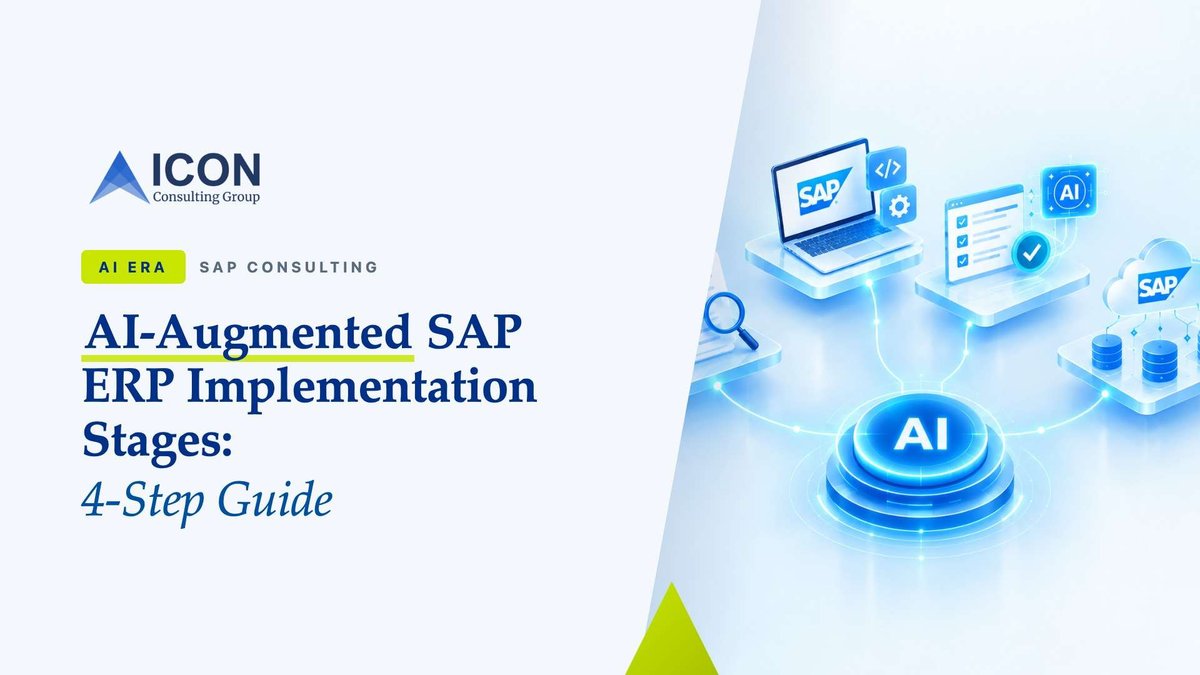
AI-augmented SAP ERP implementation stages are the points in a project where AI takes on the drafting, sorting and cross-checking work, so consultants can spend their hours on decisions instead of documentation.
AI-augmented SAP ERP implementation stages are the points in a project where AI takes on the drafting, sorting and cross-checking work, so consultants can spend their hours on decisions instead of documentation. On our S/4HANA programmes that comes down to four stages: scope definition, requirements workshops, blueprint and functional design, and test preparation. Here's what AI does in each, what stays with people, and where teams go wrong.
What are AI-augmented SAP ERP implementation stages?
They're the phases of an SAP project, mostly the front half of SAP Activat, where AI speeds up documentation-heavy work without changing who makes the calls. Picture AI as a very fast junior analyst. It drafts, summarises and flags inconsistencies; a senior consultant reviews and signs off.
Why focus on the front half? Because that's where SAP projects actually lose time. A requirement misunderstood in Explore doesn't show up until user acceptance testing, and by then fixing it means rework across configuration, data and test scripts. Getting requirements right faster is what moves the go-live date.
→ Read more: What AI Is Changing on SAP Programmes (And What It Isn't)
Here's how the four AI-augmented SAP ERP implementation stages map to SAP Activate:
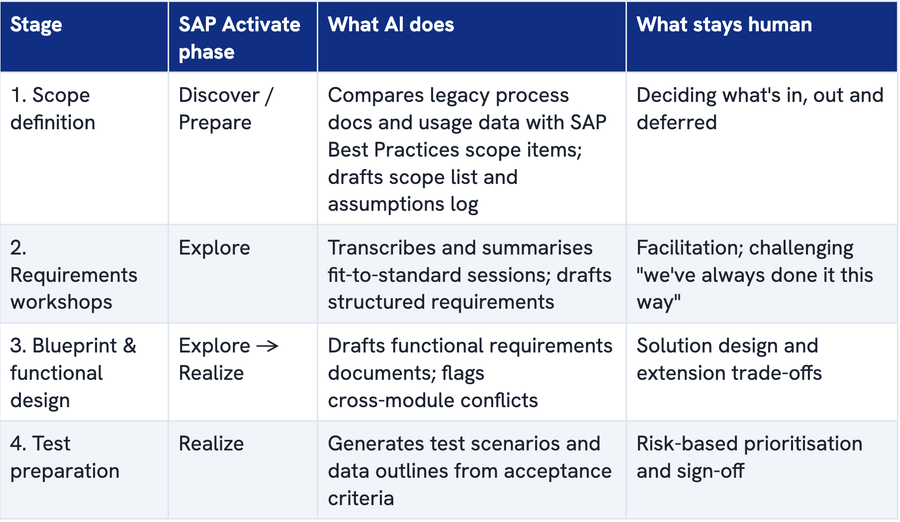
Most of what's on the SAP S/4HANA implementation accelerators AI 2026 roadmap, AI-assisted requirements in SAP Cloud ALM, Joule inside SAP Signavio, lands squarely in these four stages.
Stage 1: Scope definition
Scope is the first of the AI-augmented SAP ERP implementation stages, and the one where an hour of AI-assisted analysis saves the most rework later.
Can AI tools help with SAP scope definition?
Yes — mainly by shortening the analysis that happens before the first workshop. SAP scope definition AI tools can read legacy process documentation, ECC transaction usage and org structures, then produce a first-pass list of SAP Best Practices scope items with open questions attached.
In practice, S/4HANA scoping AI gives the project team three things on day one:
- A shortlist of candidate scope items, each linked back to the legacy evidence that suggested it.
- A draft assumptions and exclusions log, ready for the steering committee to argue over.
- A list of processes with no obvious standard fit — your early warning for gaps.
Our take: the biggest scope risk usually isn't a missed process, it's gold-plating. AI tools lean towards suggesting more, not less. We review every AI-drafted scope list through one lens: what can we safely defer to a later wave?
Stage 2: How to improve SAP requirements gathering with AI
Record your fit-to-standard workshops, let AI turn transcripts into structured draft requirements, and let consultants focus on the conversation. SAP Cloud ALM now does this natively, generating requirements from workshop transcripts into a predefined template and suggesting Best Practices solution proposals. SAP puts the saving at up to 50% of requirement-writing time and around 20% of user-story creation.
Workshops are the most time-hungry of the AI-augmented SAP ERP implementation stages. SAP has long recommended two experts per workshop, one to demo and lead, one to document. With AI in the loop, that second expert shifts from typist to reviewer, and that's what makes this AI-assisted business analysis SAP consultants can actually trust: every draft is checked by someone who was in the room. The SAP requirements workshop best practices that matter most in this setup:
- Load the agreed scope baseline and demo script into the tool before the session, so drafts are anchored to real scope items.
- Say decisions out loud ("Decision: we're using standard credit management"). Explicit phrasing makes transcripts far more usable.
- Review AI drafts within 48 hours, while memories are fresh.
- Keep every requirement traceable to a transcript timestamp, so a disputed item can be checked in seconds.
The mistake we see most: feeding raw transcripts to AI without a scope baseline. The tool dutifully turns every tangent into a requirement, and a gap list of 40 becomes 140 overnight.
Stage 3: SAP blueprint phase AI from workshop notes to functional design
Once requirements are approved, SAP blueprint phase AI takes over the heavy drafting. It writes each SAP functional requirements document in a consistent template and — more valuably — cross-checks documents against each other. A classic catch: a pricing requirement in sales that assumes a condition type procurement never maintains.
What should an SAP functional requirements document include?
A good FRD links the business requirement to its process step and scope item, classifies it as fit or gap, proposes a solution (standard, configuration or extension), and states acceptance criteria and dependencies. If any of those are missing, AI can't generate useful tests later, so we treat the template as non-negotiable.
We also have AI classify every gap against SAP's extension options, flagging anything that implies modifying standard code. That keeps clean core decisions visible early, when they're cheap. The design decision itself stays with the solution architect.
Stage 4: Test preparation
Test preparation is where the earlier AI-augmented SAP ERP implementation stages pay off. When requirements are structured and traceable, AI can generate test scenarios, variants and data outlines straight from acceptance criteria. On the development side, SAP reports roughly 25% less testing time for teams using Joule for Developers' unit test generation.
What AI can't do is judge business risk. Consultants still decide which scenarios must pass for go-live, which can wait, and how the suite feeds regression test automation after go-live.
Why we start upstream, not with code
Many teams introduce AI in the build, because code generation is the most visible demo. We deliberately sequence the AI-augmented SAP ERP implementation stages the other way:
- Errors caught in scope or workshops cost minutes to fix; the same errors caught in UAT cost weeks.
- Stages 3 and 4 only work if Stage 2 produced clean, traceable requirements. Skip the foundation and AI simply produces bad documents faster.
- Governance is simpler upstream: workshop recordings stay in approved, tenant-controlled tools, and every AI output has a named human reviewer.
Putting AI-augmented SAP ERP implementation stages to work
The payoff of AI-augmented SAP ERP implementation stages is a team spending its time on judgement: scope trade-offs, design choices and risk calls. Start with scope and workshops, insist on traceability, and let the later stages inherit that structure.
If you're planning an S/4HANA programme and want to see how this works on your scope, talk to Icon's SAP Consulting team.
Frequently Asked Questions
Will AI replace SAP functional consultants?
No. AI automates repetitive work such as first-draft documentation, transcript summaries and routine test cases. The judgement-heavy work, process design, trade-offs, stakeholder alignment and change management, still needs experienced consultants, and someone has to verify that AI output is correct.
What is SAP Joule for Consultants?
Joule for Consultants is SAP's conversational AI assistant for implementation teams. It answers questions about SAP solutions, configuration and cloud transformation using SAP's own knowledge base, with source citations so consultants can check the answer before relying on it.
How long does the SAP blueprint (Explore) phase take?
For a mid-sized S/4HANA implementation, blueprinting typically runs about 8–12 weeks, depending on scope, number of entities and decision speed. AI shortens the documentation effort inside that window, but it doesn't shorten how long the business takes to make decisions.
Is it safe to use AI on SAP workshop recordings?
It can be, with the right controls. Workshop recordings often contain employee, customer and pricing data, so use AI tools approved by your organisation that keep data within your tenant, agree retention rules up front, and tell participants that sessions are being recorded and summarised.
What skills do SAP consultants need to work with AI?
Strong process knowledge matters more than ever, because it's what lets a consultant spot a wrong AI suggestion. On top of that: writing clear, context-rich prompts, working with tools like SAP Cloud ALM and Signavio, and understanding clean core extension options.